
Welcome to Optionality — your AI-powered platform for business valuations, exit planning, and M&A strategy. This guide walks you through the core concepts, navigation, and first steps to help you get up and running quickly.
What is Optionality?
Optionality is built for professionals who work at the intersection of business value and strategic decisions. Whether you are an entrepreneur preparing for an eventual exit, an M&A advisor working with clients on sale readiness, an investment banker building deal materials, or a private equity professional evaluating targets — Optionality combines AI with a proprietary knowledge base to automate the most time-consuming parts of company analysis.
The platform covers the full spectrum of M&A intelligence:
- Company benchmarking against public and private comparables
- Enterprise valuation using multiple methodologies
- Buyer identification (strategic and financial)
- Debt capacity and bankability analysis
- Structured exit readiness assessments
- AI-generated executive summaries with PowerPoint export
Navigating the App
The top navigation bar gives you quick access to the two main areas of the platform:
- Dashboard — Your home base. See all your company profiles at a glance, search and filter them, and create new ones using the + New Company button.
- Deal Sourcing — Build and manage curated lists of companies for deal flow research, prospecting, or sector tracking.
In the top-right corner you will also find:
- USD / CAD toggle — Switch the currency used throughout all financial analysis across the platform.
- Profile icon — Access your account settings.
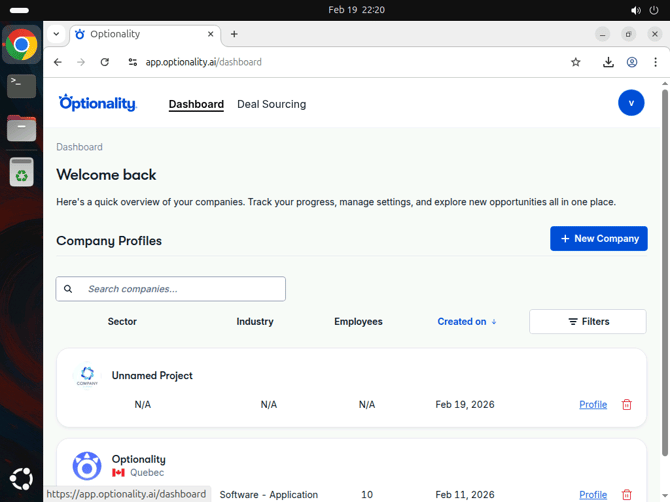
The Optionality Dashboard — your central hub for all company profiles. Click + New Company to get started.
Meet EMA — Your AI Co-Pilot
EMA is Optionality's built-in AI co-pilot, available throughout the platform. She helps you:
- Research and pre-populate company profiles automatically
- Interpret analysis results and benchmark comparisons
- Guide you through the Exit Readiness assessment with contextual insights
- Answer questions about your data directly in the Executive Summary via Ask EMA
💡 Tip: Look for the Generate Profile button and AI Recommended toggles throughout the platform — these are EMA-powered shortcuts that can save hours of manual research.
Company Profile Sections
Every company in Optionality has a full profile accessible from the Dashboard. Inside, the left sidebar is your navigation guide — each section is marked with a ✓ (complete) or ⚠ (needs attention) status icon.
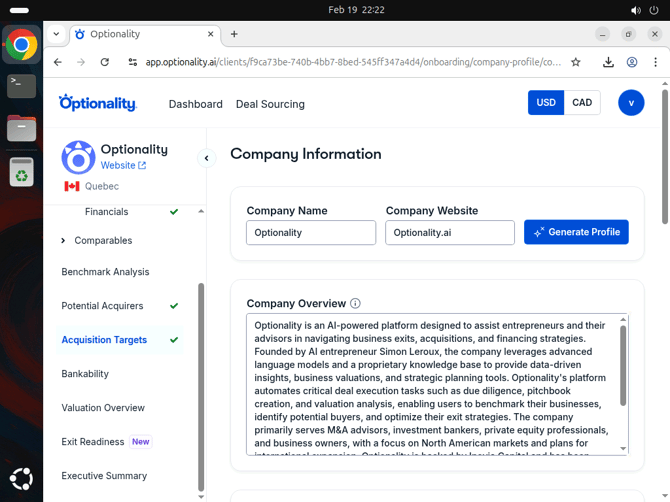
The company profile sidebar showing all available analysis sections, including the new Exit Readiness module.
Here is what each section covers:
🏢 Company Profile
The foundation of your analysis. Contains Information (overview, products, team), Competitors, and Financials. The more complete this is, the better all downstream analysis will be.
📊 Comparables
Find similar companies to benchmark against — both Public Companies (traded) and Past Transactions (historical M&A deals). Use AI Recommended mode for instant matching.
📈 Benchmark Analysis
Compare your company's metrics against the peer group across growth, profitability, efficiency, capital utilization, and financial strength.
🏠 Potential Acquirers
AI-surfaced strategic and financial buyers based on the company's profile, with filters for size, geography, and more.
🎯 Acquisition Targets
Find companies the business could potentially acquire — useful for buy-side M&A strategies.
🏢 Bankability
Evaluate debt capacity using industry-standard financial ratios. Understand how much leverage the business can support and the impact on annual debt payments.
💰 Valuation Overview
Comprehensive enterprise valuation using revenue and EBITDA multiples, cross-referenced with comparable company and transaction data.
🚪 Exit Readiness (New)
A structured 58-question assessment evaluating financial, owner, and business readiness for a successful exit. Guided by EMA throughout.
📋 Executive Summary
The full Optionality report in one place — key insights, strategic recommendations, and value creation roadmap. Export as PowerPoint or explore with Ask EMA.
🔍 Deal Sourcing
Build and manage curated company lists for deal flow, sector research, or prospecting — accessible from the top navigation bar.
Getting Started: Your First Three Steps
- Add a Company — From the Dashboard, click + New Company. Enter the company name, website, employee count, and location. Choose between AI-Powered Analysis (recommended for speed) or Expert Mode (for full manual control).
- Complete the Profile — Fill in Company Information, Competitors, and Financials. Use the Generate Profile button to let EMA do the heavy lifting. Address any ⚠ sections in the sidebar — they affect the accuracy of all downstream analysis.
- Explore the Analysis — Navigate through Comparables, Benchmark Analysis, Valuation, and more. When ready, run the Exit Readiness assessment and generate your Executive Summary for export.
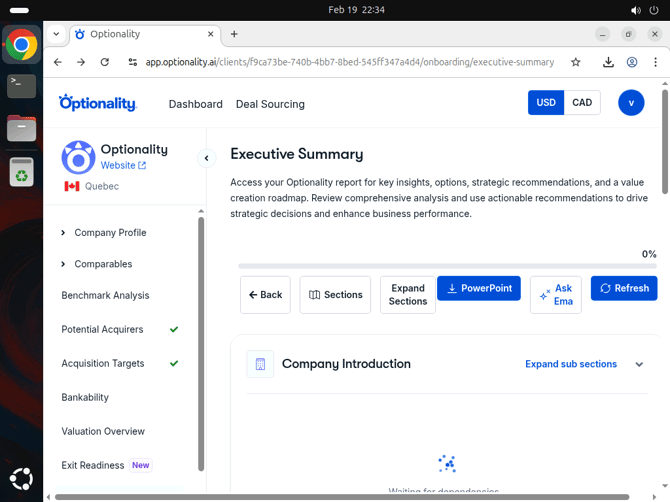
The Executive Summary page — export to PowerPoint, ask EMA questions about the analysis, or toggle individual report sections on or off.
Tips for Getting the Most Out of Optionality
- Start with accurate financials. The quality of benchmarking, bankability, and valuation analysis depends directly on the financial data you provide.
- Use AI generation to move fast. The Generate Profile button on the Company Information page can save hours of manual data entry.
- Complete all sections. Sections marked with ⚠ indicate missing data that may affect the accuracy of downstream analysis.
- Use EMA. Your AI co-pilot is available throughout the platform to guide you, answer questions, and help interpret results.
- Toggle USD / CAD in the top-right corner to match your reporting currency before reviewing financials or valuations.
Frequently Asked Questions
Can I manage multiple companies?
Possibly depending on your contract. All of them appear on your Dashboard where you can search, filter, and manage them.
What currency does Optionality use?
You can toggle between USD and CAD at any time using the currency switcher in the top-right corner. This affects all financial figures displayed across the platform.
Is my data saved automatically?
Yes. Your progress is saved automatically as you work through each section — including the Exit Readiness assessment.
What is EMA?
EMA is Optionality's AI co-pilot. She guides you through assessments, answers questions about your analysis, and helps you interpret results — available throughout the platform.
Have questions or need help? Reach out to our support team — we are happy to help.